Biểu tượng Glow
出張マッサージ
24時間年中無休

HOW TO RECEIVE MASSAGE ORDER ON THE GLOW APP

07:47, 28-01-2026

CONTENT

1. Update your work schedule 

2. Detailed instructions for receiving orders


If you haven't registered as a Glow Therapist yet, please register following the instructions here:

👉 Glow Therapist Registration Guide

1. UPDATE YOUR WORK SCHEDULE
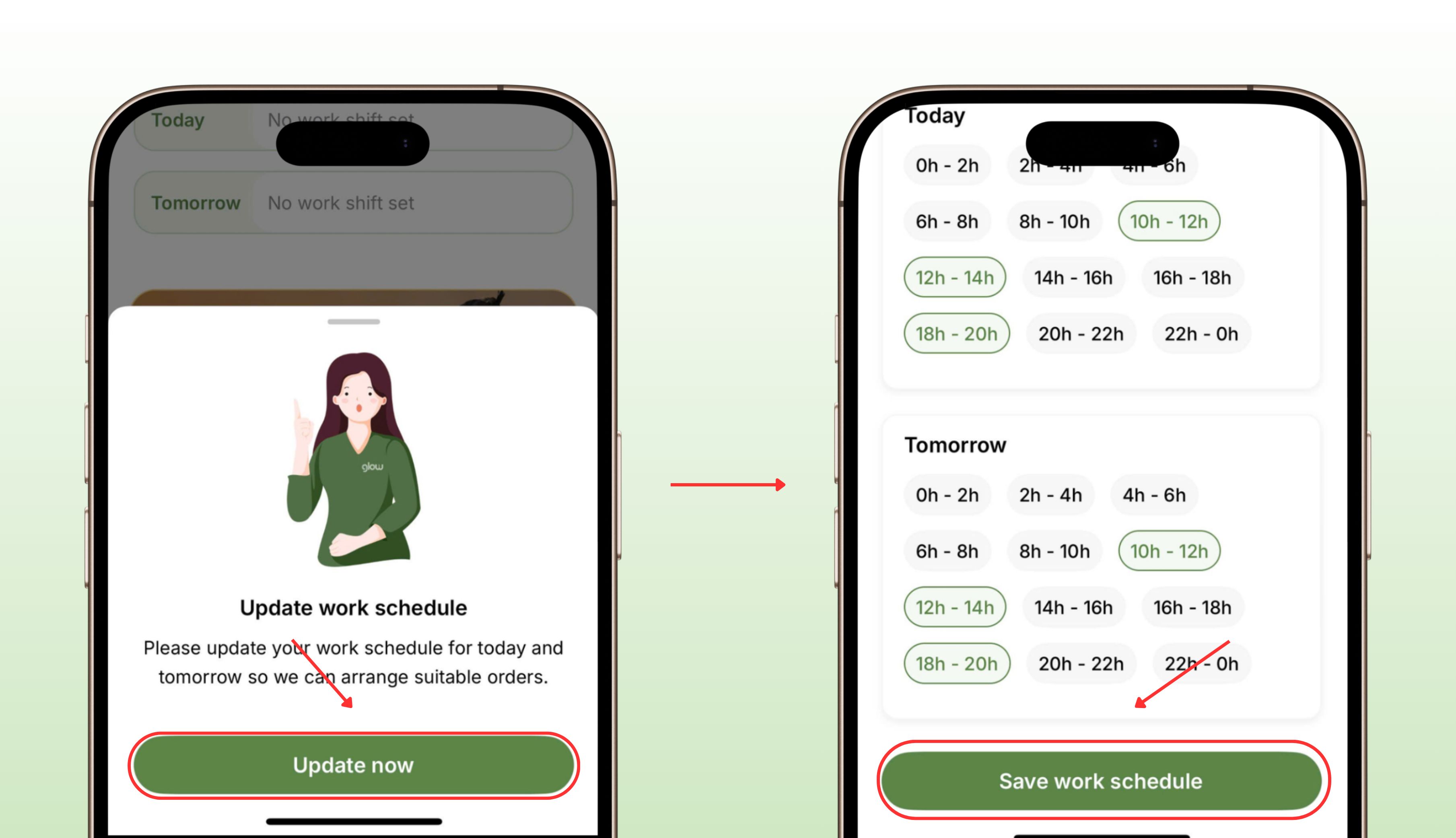
Step 1: Go to the Glow App → Tap “Update Now”

Step 2: Select the time and tap “Save Work Schedule”

* Note:

- You need to update your work schedule for your profile to be displayed on the app.

- You can edit your work schedule after updating it.


2. DETAILED INSTRUCTIONS FOR RECEIVING ORDERS

*Note: You need to grant location access to the Glow app to be assigned orders that match your location.
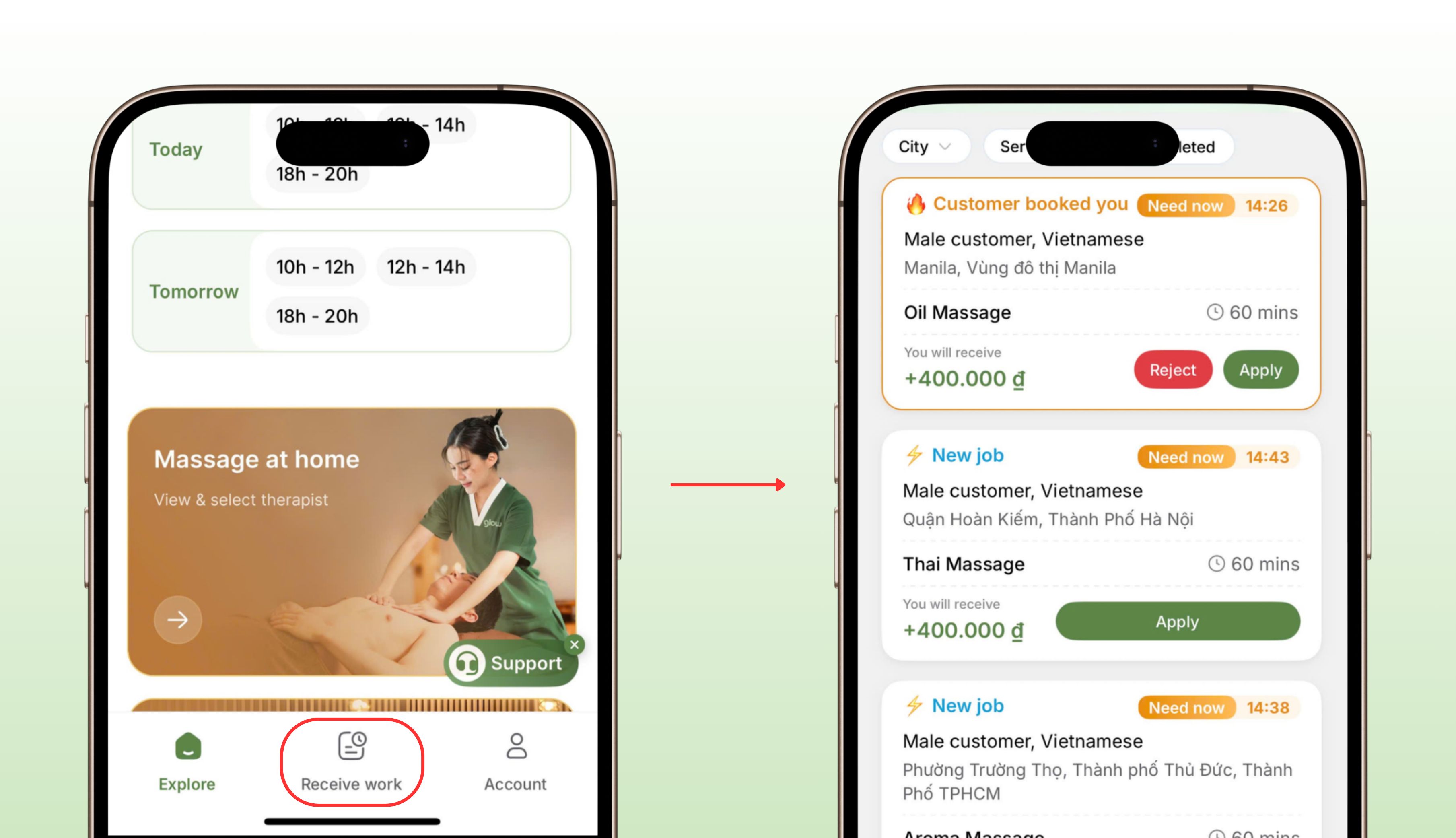
Step 1: Go to “Receive Work” → View Order List

Orders are displayed with the following statuses:

  • Customer booked you: If you can do it, click “Apply” on the order. You don't need to wait for the customer to select if applying for an order “Customer requested you”.

  • New job: Customer has not yet selected a therapist. You need to wait for the customer to select if applying for an order.

  • Expired: Customer has already selected a therapist.

Click on the order and carefully read the information including:

a. Service and service time

b. Address

c. Payment method, amount you will receive

d. Gender and nationality of the customer
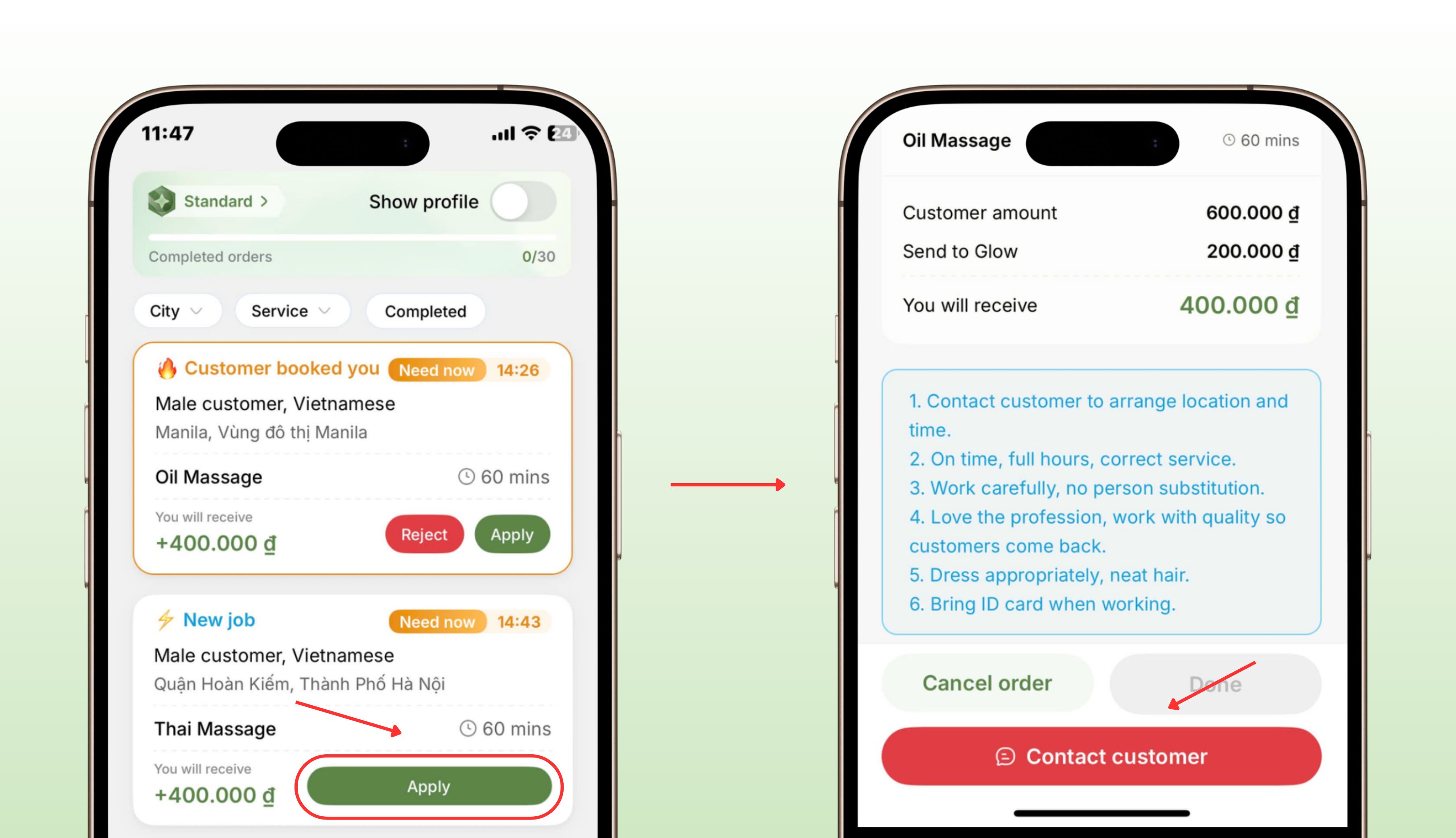
Step 2: Click “Apply” on the orders you can do and wait for the customer to select.

"Apply" means agreeing to accept the order, so you are responsible for your actions when you click "Apply".

You can apply for multiple orders at the same time (provide you are able to complete them).

If an unexpected issue arises, click "Cancel Apply".

Note: "Cancel Apply" and "Cancel Order" are different.

  • Cancel Apply: cancels your acceptance of the order before being selected by the customer.

  • Cancel Order: cancels the order after being selected by the customer.

Step 3: Contact the customer when you are selected.

Glow will notify you on the app, and the call center will call you to inform you that you have been selected.

Click on the order, then confirm the amount to be collected from the customer.

Click "Contact Customer" to send a message (or click the Call button if the customer doesn't reply to messages on the app) to confirm the address and travel time.

If the customer is foreign, use Google Translate.

After completing the order, click "Done" on the Glow app.
ブログ記事
もっと見る
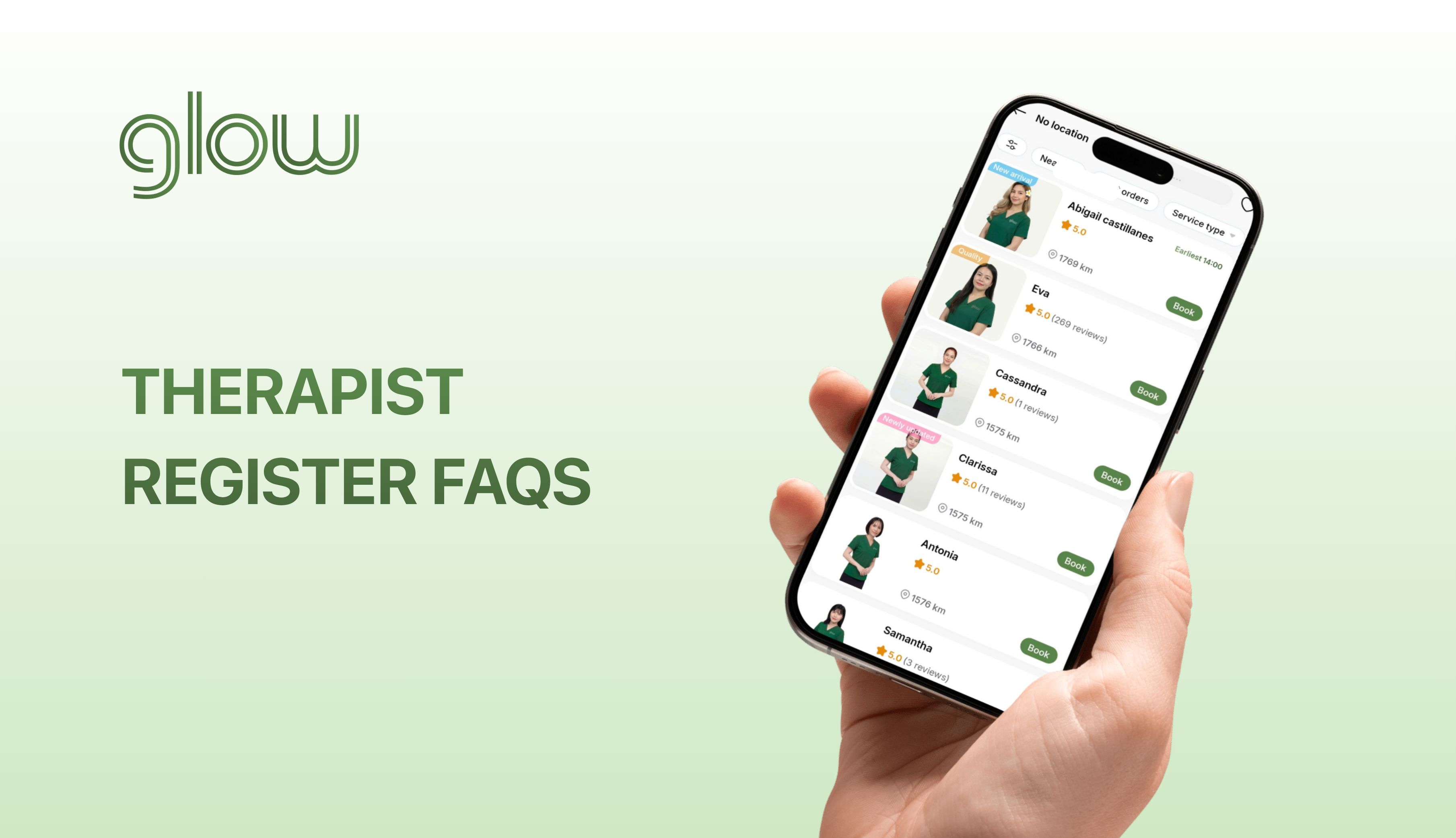
Ảnh mô tả bài viết FREQUENTLY ASKED QUESTIONS WHEN REGISTERING AS A GLOW THERAPIST
FREQUENTLY ASKED QUESTIONS WHEN REGISTERING AS A GLOW THERAPIST
Things to know and answers to frequently asked questions when registering as a Glow therapist
07:25, 20-03-2026
Ảnh mô tả bài viết MGA MADALAS ITANONG KAPAG NAGRE-REHISTRO BILANG ISANG GLOW THERAPIST
MGA MADALAS ITANONG KAPAG NAGRE-REHISTRO BILANG ISANG GLOW THERAPIST
Mga dapat malaman at mga sagot sa mga madalas itanong kapag nagpaparehistro bilang isang Glow therapist
07:19, 20-03-2026
Ảnh mô tả bài viết PAANO TUMANGGAP NG ORDER PARA SA MASSAGE SA GLOW APP
PAANO TUMANGGAP NG ORDER PARA SA MASSAGE SA GLOW APP
Isang simple at detalyadong gabay kung paano gamitin ang Glow para makatanggap ng mga order
08:07, 28-01-2026
Ảnh mô tả bài viết HOW TO RECEIVE MASSAGE ORDER ON THE GLOW APP
HOW TO RECEIVE MASSAGE ORDER ON THE GLOW APP
A simple and detailed guide on how to use Glow to receive orders.
07:47, 28-01-2026
Ảnh mô tả bài viết PAANO MAGREHISTRO PARA MAGING GLOW THERAPIST
PAANO MAGREHISTRO PARA MAGING GLOW THERAPIST
Ang pinakasimple at pinakadetalyadong gabay sa pagpaparehistro bilang isang Glow therapist
03:29, 28-01-2026
Ảnh mô tả bài viết HOW TO REGISTER TO BECOME A GLOW THERAPIST
HOW TO REGISTER TO BECOME A GLOW THERAPIST
The simplest and most detailed guide to registering as a Glow therapist
03:17, 28-01-2026
Ảnh mô tả bài viết Quality therapist benefits
Quality therapist benefits
Promoted by Glow to get more orders. Get higher income
14:15, 06-12-2025
Glow logo

Glow - 多サービス出張プラットフォーム

Link to download the Glow app on the App Store
Link to download the Glow app on Google Play
Glow facebook fanpage
Glow instagram fanpage
Glow's youtube channel
Glow's twitter channel
Glow's LinkedIn channel
Glow's tiktok channel
IMg Glow Pinterest
© 2022. BKベトナムテクノロジー株式会社。事業登録番号:0110124791(2022年9月21日ハノイ計画投資局発行)。
住所:ハノイ市イエンホア区チャンドゥイフン170番地5階。法定代理人:ド・タン・ビン - 取締役。電話:0888129100。メール:support@glowvietnam.com
Glow logo

Glow - 多サービス出張プラットフォーム

Glow facebook fanpage
Glow instagram fanpage
Glow's twitter channel
Glow's LinkedIn channel
Glow's tiktok channel
Glow's youtube channel
IMg Glow Pinterest

情報

ハノイ市カウザイ区チュンホア、グエンゴックヴ169番地14階
0888129100
事業登録番号
0110124791
support@glowvietnam.com
Link to download the Glow app on the App Store
Link to download the Glow app on Google Play
© 2022. BKベトナムテクノロジー株式会社。事業登録番号:0110124791(2022年9月21日ハノイ計画投資局発行)。
住所:ハノイ市イエンホア区チャンドゥイフン170番地5階。法定代理人:ド・タン・ビン - 取締役。電話:0888129100。メール:support@glowvietnam.com